System Overview
Components
EasyLife 365 Identity consists of several components hosted on Azure.

App
The EasyLife 365 Identity is a web application accessible through a web browser and directly through Teams. It uses a dedicated Entra ID application on the Microsoft Identity platform for authentication, ensuring security with Microsoft standards. The app provides an overview of the resources owned by a user, including all necessary compliance requirements. Users can also request new resources specified by those allowed to configure EasyLife 365 Identity through EasyLife 365 Admin.
Admin
The EasyLife 365 Admin is a web application hosting the configuration pages for EasyLife 365 Identity. It is accessible through a web browser and can be restricted to selected users within your organization. Typically, permissions for this app are assigned to a small subset of administrators via a security group. Authentication is managed by an Entra ID application on the Microsoft Identity Platform, allowing you to limit access and enforce additional authentication techniques using conditional access policies.
API
The EasyLife 365 API is accessed by the EasyLife 365 Identity and EasyLife 365 Admin to manage the necessary information stored in the back-end storage. This web app is secured through a dedicated Entra ID app using the Microsoft Identity Platform. The EasyLife 365 API uses Microsoft Graph to interact with the Microsoft 365 environment, with access to endpoints secured using custom security scopes associated with your EasyLife 365 Identity and users.
Engine
The EasyLife 365 Identity Engine is an Azure Function responsible for provisioning new resources and performing regular compliance checks in your tenant. It also sends notifications to users and administrators via a shared mailboxes and can send notifications through Teams or other applications using the Webhook feature.
Storage
The EasyLife 365 Identity configuration (e.g., templates, policies) is stored in Azure Table Storage. The storage account is accessible by the EasyLife 365 API and the EasyLife 365 Identity Engine.
Logging
Application Insights is used to log operations performed by EasyLife, maintaining 90 days of logs containing metadata of processed groups and emails of users receiving notifications.
Microsoft Graph
Microsoft Graph is used by EasyLife 365 components to interact with the Microsoft 365 tenant. It provides a unified programmability model to access data and intelligence in Microsoft 365, Windows 10, and Enterprise Mobility + Security.
Entra ID
The Microsoft Identity Platform is used in combination with Entra ID to secure access to all EasyLife 365 components. The EasyLife 365 Identity, EasyLife 365 Admin, and EasyLife 365 API have dedicated Entra ID app registrations that can be secured using techniques such as Conditional Access.
Architecture and Data Flow
This section provides an overview of how EasyLife 365 components interact and how the environment is accessed.
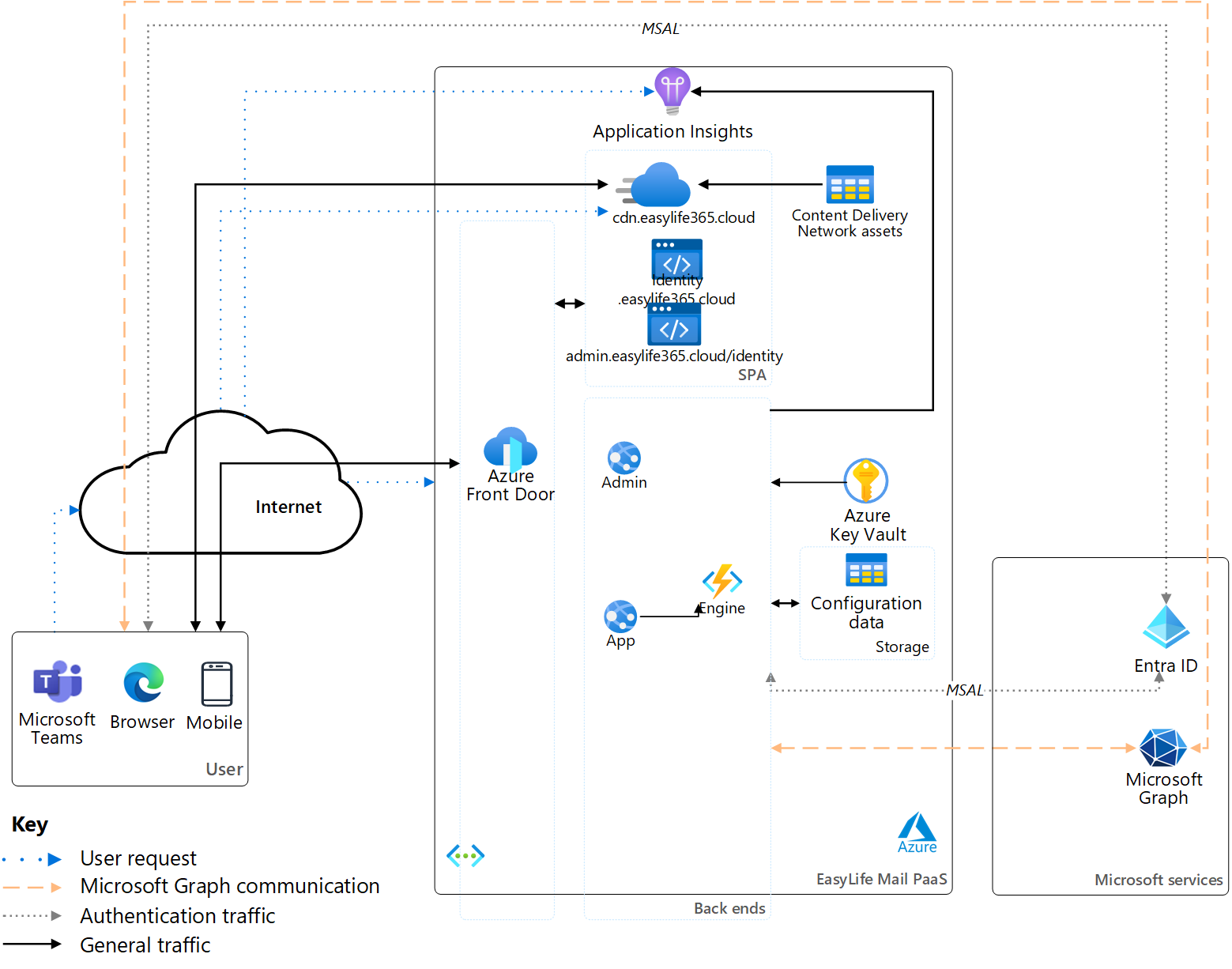
All components are secured behind an Azure Virtual Network, with all external internet traffic to the EasyLife 365 Identity environment routed through an Azure Front Door and Web Application Firewall for load balancing and security. Only a few services, such as our GitHub for automated deployment and selected engineers over a secured network for emergency purposes, have access to the environment.
Incoming user traffic is routed through an Azure Front Door and Web Application Firewall, which secures the web applications and the environment from documented vulnerabilities. See details here. All endpoints are secured using Entra ID applications with the Microsoft Identity Platform. Interactions between internal applications are secured with role-based access control and managed identities. Azure Key Vaults, accessible only by managed identities and selected security engineers at EasyLife, store security keys when managed identities cannot be used.
The EasyLife 365 Identity and EasyLife 365 Admin use Microsoft Graph with delegated identity permissions to perform activities on your Microsoft 365 tenant. This means users can only perform operations they are authorized to execute in your Microsoft 365 tenant.
Users can request new resources in the EasyLife 365 Identity based on template configurations from EasyLife 365 Admin. All CRUD operations on these configurations are processed through the EasyLife 365 API. The EasyLife 365 Identity reads the configuration information, while EasyLife 365 Admin allows you to create, update, and delete settings as needed.
The EasyLife 365 Identity Engine handles new resource requests from users, creating new resources with Microsoft Graph. All operations are executed in the context of the EasyLife 365 Identity.
EasyLife 365 stores information in multiple storage locations and accounts to ensure resiliency and performance. Data partitioning is managed using the customer's TenantID, ensuring correct access to resources with security tokens from the Microsoft Identity Platform.
Endpoints
The EasyLife 365 Identity and EasyLife 365 Admin run in the user's browser and inside the Microsoft Teams client. Every endpoint below is therefore called from your users' and administrators' own devices, not from a server in your data center. Make sure all of them are reachable from every network those devices connect from: your internal corporate network as well as external networks such as home offices, VPN connections and mobile data.
All traffic is HTTPS over TCP/443. Our endpoints are published through Azure Front Door, whose IP addresses are not dedicated to EasyLife 365 and change without notice, so allow them by hostname and never by IP address. Proxies, content filters and TLS inspection policies need the same entries.
EasyLife 365 endpoints
| Endpoint | Used by | Purpose |
|---|---|---|
| https://identity.easylife365.cloud | Users | The EasyLife 365 Identity web app, opened in a browser or embedded in Microsoft Teams. |
| https://onboarding.easylife365.cloud | Administrators | The EasyLife 365 Onboarding, where you grant the required permissions to EasyLife 365 Identity. |
| https://admin.easylife365.cloud/identity | Administrators | EasyLife 365 Admin, where you manage policies, rules and settings. |
| https://api.easylife365.cloud | Users and administrators | The EasyLife 365 API. Both web apps call it for every read and write, so if it is blocked they load but stay empty. |
| https://cdn.easylife365.cloud | Users and administrators | Static content — scripts, styles and images — for both web apps. |
Microsoft endpoints
The EasyLife 365 Identity and EasyLife 365 Admin call these Microsoft services directly from the browser. They are part of the Microsoft 365 URLs and IP address ranges your tenant already requires, and are listed here so you can confirm they are open on the same networks.
| Endpoint | Used by | Purpose |
|---|---|---|
login.microsoftonline.com | Users and administrators | Entra ID sign-in. If it is blocked, nobody can authenticate. |
graph.microsoft.com | Users and administrators | Microsoft Graph, called with the signed-in user's delegated permissions. |
dc.services.visualstudio.com | Users and administrators | Anonymous usage and error telemetry. Optional: blocking it costs us diagnostic data but does not affect the EasyLife 365 Identity. |
Required Permissions
EasyLife 365 Identity uses the Microsoft Identity Platform to manage authentication and authorization against your Microsoft 365 tenant. It uses Microsoft Graph and the SharePoint REST API to access your resources. EasyLife 365 Identity employs EasyLife 365 Admin and EasyLife 365 Entra ID application to perform operations in the context of a user or administrator.